7 Best Yuka Alternatives in 2026: Food Scanners and Nutrition Trackers Compared
Quick answer: Start with the job, not a universal score. Eatibo connects food scans with a daily log and review, Open Food Facts provides open product data, Fooducate keeps grades simple, Cronometer goes deep on nutrients, MyFitnessPal centers the diary, Fig checks dietary restrictions, and Think Dirty covers cosmetics and personal care.
Yuka is a useful reference point because it makes a complicated label feel quick. Scan a food or cosmetic product, see how it is rated, read the reasons, and look at suggested alternatives. But people searching for Yuka alternatives are not always looking for the same replacement. One person wants an open barcode database. Another wants to track every meal for a month. Someone with a dietary restriction cares less about a general score than whether a specific ingredient conflicts with a personal rule.
This guide maps seven apps to those jobs instead of pretending they were built for the same task.
Disclosure: Eatibo publishes this article and is one of the products compared. We reviewed official product pages, help centers, and public app listings on August 14, 2026. We did not run a controlled, hands-on accuracy test across every app, so this is not a database-size, scan-accuracy, or current-price benchmark. Features and plan limits can change. Check the current app listing before subscribing.
Yuka alternatives at a glance
| App | Documented fit | Ongoing view | Current access note | Main limit |
|---|---|---|---|---|
| Eatibo | Food scan to daily log and review | Calendar, Daily Overview, and recent-log insights | US App Store: free download with in-app purchases on iPhone and iPad | Food-focused; not a cosmetics scanner |
| Open Food Facts | Open packaged-product lookup | Product records and comparison, not a personal meal diary | US App Store: free; public web database available | Community-maintained records still need label verification |
| Fooducate | Food grades and simpler swaps | Food and diet tracking | Free on iOS, Android, and web; product support and nutrition data currently cover US and Canadian products | One grade cannot capture every personal priority |
| Cronometer | Detailed nutrient tracking | Time-range Nutrition Reports | Free account and barcode scanner; web, iOS, and Android | Deliberate logging takes more attention than a shelf verdict |
| MyFitnessPal | Broad meal logging | Daily Diary | Manual logging is free; current US plan lists barcode and Meal Scan features under Premium | Product lookup does not explain labels in Yuka's style |
| Fig | Dietary-restriction matching | Personal profile and product checks | Official site: free download on iOS and Android; United States only | Screening does not replace the package allergen statement |
| Think Dirty | Cosmetics, personal care, and household products | Product lists and ingredient information | Official site promotes a subscription with a free trial | Not a meal or nutrition tracker |
There is no single winner in this table. The useful question is: which row matches the decision you make most often?
What Yuka already does well
According to Yuka's official product page, the app scans food and cosmetic products, explains its ratings, and recommends alternatives when a product receives a poor score. That compact scan, explanation, and swap loop is why a replacement should not be judged on barcode scanning alone.
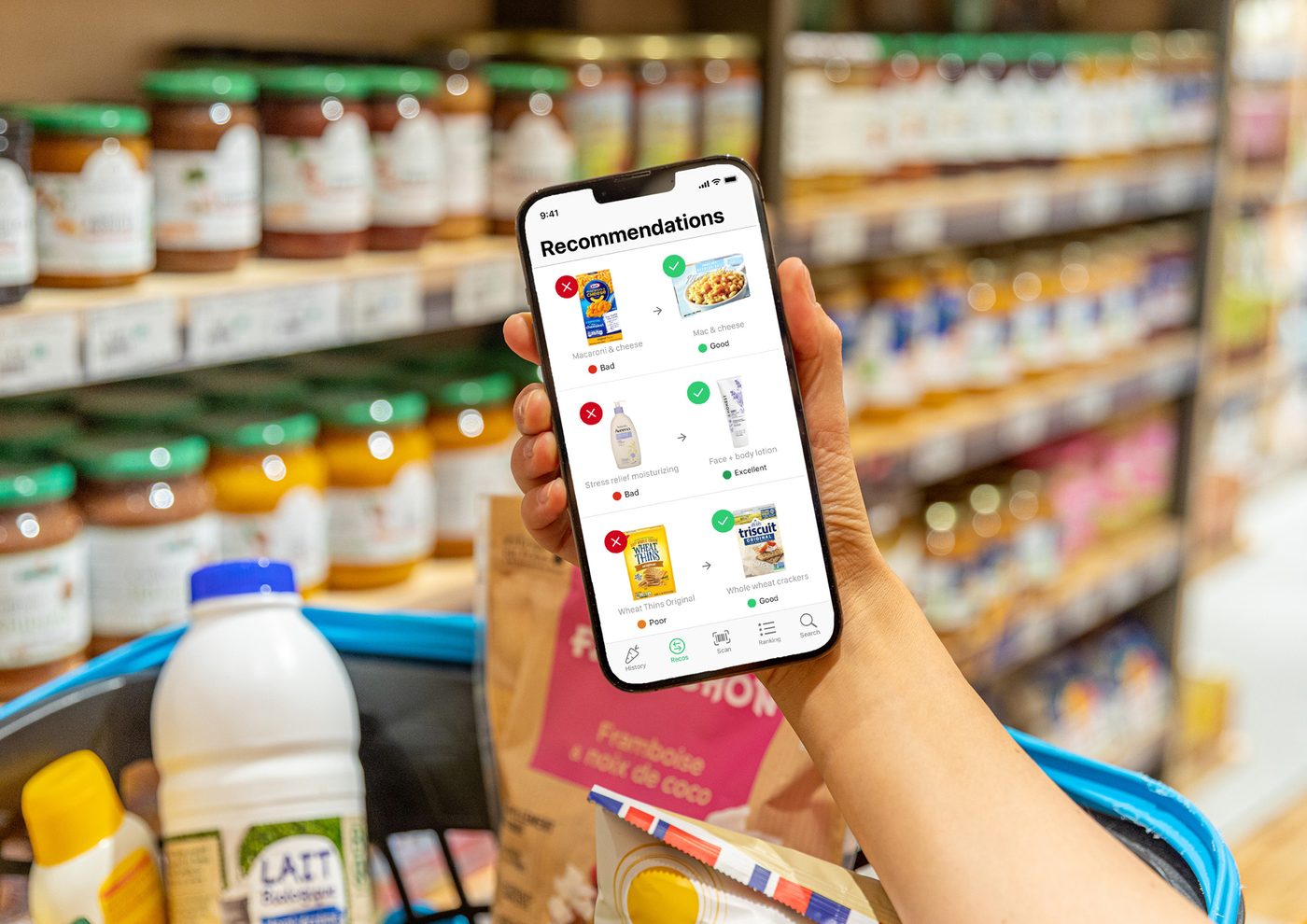
Yuka recommendations screen. Source: Yuka official press kit. Yuka is a trademark of Yuca SAS. Eatibo is not affiliated with or endorsed by Yuka.
The limits appear when your question extends beyond one product. A score can help with a choice in the aisle, but it does not automatically answer: How did I eat this week? Which meals keep pushing sodium higher? Am I consistently short on protein? Does a product match my specific restriction rather than a general rating model? That is where the alternatives start to separate.
How we compared the apps
This is an official-source feature comparison, not a hands-on ranking. We checked four things that vendors document publicly: the product category each app covers, how a user enters or scans an item, whether the result continues into a personal log or report, and any clearly stated plan, platform, or regional limits. The access notes above are a dated snapshot, not a promise that a feature will remain free.
We did not score scan accuracy, database coverage, correction time, or ease of use because that would require the same products, devices, accounts, and test protocol across every app. The five-product test later in this guide is a way for you to measure those points against your own routine.
Think Dirty belongs here because some Yuka users primarily scan cosmetics. Fig belongs because a restriction-first decision is different from a general nutrition score. Cronometer and MyFitnessPal belong because other searchers are really trying to move from product ratings to sustained meal tracking.
1. Eatibo: from a food scan to daily review
Eatibo's current US App Store listing describes food scanning, quick edits, recent-log analysis, and a calendar view. The Eatibo Food Additive Risk Alerts page shows how a label or package scan can be reviewed and then saved. These are first-party product descriptions, not an independent performance test.
Inside the product, saved entries feed the Nutrition Log and Daily Overview, so a scan can become part of a longer view of calories, macros, hydration, and eating patterns rather than ending at a one-time rating.
That continuity matters. A snack can look reasonable in isolation and still become the item that repeatedly lifts sodium or added sugar. A protein bar may work well on travel days but become a weak breakfast default. The point is not to make one scan sound more certain. It is to connect the scan to what you actually ate.
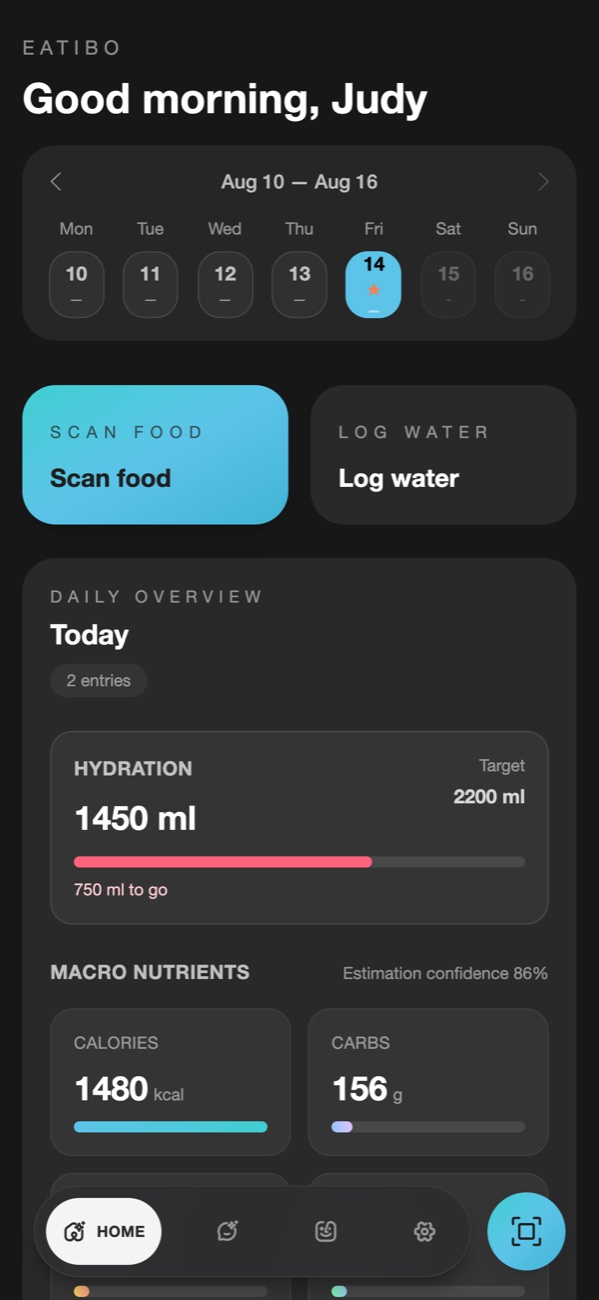
Eatibo Daily Overview captured from the real frontend on August 14, 2026, using fictional, non-user test data. The values illustrate the interface; they are not medical targets or a safety certification.
Eatibo also surfaces additive and preference signals through its Food Additive Risk Alerts. If you only need to inspect an ingredient name, the free Food Additive Checker is a faster starting point than creating a full log.
2. Open Food Facts: open barcode lookup
Open Food Facts is an open, collaborative product database. Its current official app listing describes barcode scanning, product information, and the ability to contribute or improve records. This makes it a strong option for people who value open data, broad public access, and the chance to correct missing products.
It is especially useful for a quick packaged-food lookup. The trade-off follows from the same community model: a record can be incomplete, outdated, or tied to a different package size or country. The current label in your hand still wins. Verify serving size, ingredients, and allergen statements before acting on a database result.
Its current App Store listing also says allergen detection may not be 100% accurate and tells users to double-check the package. If openness and lookup matter more than a personal meal diary, that trade-off may be reasonable. A guided weekly nutrition review will require another tool.
3. Fooducate: simple food grades
Fooducate's official FAQ describes barcode scanning, A-to-D nutrition grades, product pros and cons, healthier alternatives, and calorie-quality tracking. For someone who likes Yuka because it compresses a label into a quick signal, Fooducate is an intuitive alternative to inspect.
The benefit of a grade is speed. The drawback is compression. Two people can look at the same product and care about different things: sodium, added sugar, protein, allergens, fiber, additives, or portion size. Treat the grade as the start of the question, then open the explanation and check the actual package.
4. Cronometer: detailed nutrient reports
Cronometer is a different kind of alternative. It is less about declaring a product good or bad in the aisle and more about recording food with nutrient detail. Its official food-tracking page documents search, barcode, photo, and voice inputs, including free barcode scanning across web, iOS, and Android. Its Nutrition Report documentation explains how users can review nutrient intake across selected time ranges, including average values.
That makes Cronometer a good fit when micronutrients and report depth matter more than instant product scoring. It can answer a question that a one-time scanner cannot: what does my recorded intake look like across several days?
The cost is attention. Detailed logs only become useful when entries and portions are reasonably complete. If you rarely log after scanning, the extra nutrient depth may not help. Cronometer is a strong choice for deliberate trackers, but it is not a direct copy of Yuka's quick recommendation loop.
5. MyFitnessPal: broad, familiar meal logging
MyFitnessPal centers the daily Diary and a large meal-logging workflow. Its help center documents barcode-based food logging and a Meal Scan. Its current US plan comparison lists the Barcode Scanner under Premium, and the Meal Scan page also describes eligibility requirements.
It fits people whose priority is recording breakfast, lunch, dinner, snacks, recipes, and exercise in a familiar tracker. That is broader than a shelf-rating app, but the decision model is also different. A database entry helps you log; it does not necessarily explain an ingredient list or suggest a better packaged alternative in Yuka's style.
The Daily Diary is the center of this workflow. Check the current plan, country, and device requirements for the scan features you care about before paying.
6. Fig: dietary-restriction screening
Fig starts from a personal dietary profile. Its public product pages describe scanning and checking foods against allergies, intolerances, and other ingredient preferences, and currently state that the service is available in the United States. That makes it more relevant than a general product score when the first question is, "Does this conflict with my list?"
This is still a screening aid, not an allergy guarantee. Formulas change, cross-contact warnings matter, and a database may not match the package in front of you. Anyone with a diagnosed allergy or risk of a serious reaction should read the full package statement and follow professional medical guidance.
7. Think Dirty: cosmetics and personal care
If you use Yuka mostly in the bathroom rather than the grocery aisle, Think Dirty is the more relevant branch of this list. Its official site focuses on beauty, personal-care, and household products, with barcode search and ingredient information.
That focus is also the boundary. Think Dirty is not a nutrition log and should not be compared with Eatibo, Cronometer, or MyFitnessPal on meal tracking. It belongs on a Yuka alternatives list because Yuka covers both food and cosmetics, while many replacements cover only one side.
Who should not choose Eatibo
Eatibo is not the right answer for every Yuka user.
- Cosmetics are your priority: Stay with Yuka or inspect Think Dirty. Eatibo is built around food and nutrition.
- You want open, reusable product data: Open Food Facts is the clearer fit.
- You want maximum nutrient-report detail: Compare Cronometer's reports with the level of detail you will actually maintain.
- You only want a familiar diary: MyFitnessPal may fit an established logging habit better.
- A severe allergy drives every decision: No consumer scanner, including Eatibo, should be treated as the final authority. Use the package, manufacturer information, and clinical guidance.
The honest reason to choose Eatibo is not that it wins every category. It is that the scan, correction, log, and weekly review live in one food-focused workflow.
A better way to test Yuka alternatives
Do not decide from a polished App Store screen. Use the same inputs in each shortlisted app and record where the friction appears.
Start with five packaged foods:
- A common national-brand product with a clear barcode.
- A store-brand or regional product.
- A product whose formula or package recently changed.
- A product with a long ingredient list.
- A product that touches one of your real restrictions or preferences.
For each scan, check the product name, package size, serving size, calories, key nutrients, ingredients, and allergens against the physical label. Note how long it takes to correct an error. A clear "not found" is often more useful than a confident match to the wrong size or flavor. A scanner that returns a result instantly but makes corrections painful may be slower in real life than one that asks for confirmation.
Then use any remaining finalists for seven ordinary days. Log the meals you truly eat, including restaurant food, leftovers, snacks, and imperfect portions. At the end, ask:
- Did I keep using it after the first two days?
- Could I correct a scan without fighting the app?
- Did the review screen show a useful pattern rather than just more numbers?
- Did the app support my actual restriction or merely offer a general score?
- Would I still use this workflow when busy?
For more on why barcode results need checking, read Food Barcode Scanner App: Check Labels Before You Log. The AI Food Scanner App guide covers photo scans and correction expectations, while the Nutrition Label Scanner guide gives a repeatable order for checking the package.
Health and allergy boundaries
Consumer food apps can organize information. They cannot diagnose a condition, determine whether a food is safe for every allergy, or replace individualized nutrition care.
Use extra care with diagnosed food allergies, celiac disease, diabetes medication, kidney disease, pregnancy-related restrictions, eating-disorder recovery, or any clinician-directed diet. Ingredient formulas and cross-contact statements can change without warning. Read the current package every time safety depends on it, and contact the manufacturer when the label is unclear.
Frequently asked questions
Which Yuka alternatives offer free barcode scanning?
Open Food Facts lists its iOS app as free, Fooducate's FAQ says its app is free on iOS and Android, and Cronometer explicitly documents a free barcode scanner. Fig offers a free download in the United States. Eatibo is free to download with in-app purchases, while MyFitnessPal's current US plan comparison places its Barcode Scanner under Premium. A free download does not mean every feature is free, so check the current listing in your country.
Which alternatives support web, iOS, or Android?
Cronometer documents web, iOS, and Android access. Fooducate documents iOS, Android, and web access, but its regional support note says product support and nutrition information currently cover US and Canadian products. Open Food Facts has a public web database and mobile app. Fig currently says it is available only in the United States. Platform availability does not guarantee useful local product coverage, so test several products sold where you live.
Is Eatibo the same as Yuka?
No. Both can help with food decisions, but their emphasis differs. Yuka documents a scan, rating, explanation, and recommended-alternative flow for food and cosmetics. Eatibo focuses on food scanning, correction, Nutrition Log continuity, and longer-term Trends and Insights. Eatibo does not position itself as a cosmetics scanner.
Can a Yuka alternative tell me whether a food is safe for my allergy?
No consumer app should be the only authority for a serious allergy. Use apps as screening aids, then verify the current ingredient list and allergen statement. Follow clinician guidance and contact the manufacturer when cross-contact or formula details are unclear.
Should I choose a product scanner or a calorie tracker?
Choose a scanner if most decisions happen while shopping and you mainly need product or ingredient context. Choose a tracker if you want to understand meals across days. If both matter, test whether the app carries a verified scan into the daily log without duplicate entry.
Last updated: August 14, 2026
Sources
- Yuka: The mobile app that scans your products
- Yuka official press kit
- Eatibo on the US App Store
- Eatibo Food Additive Risk Alerts
- Open Food Facts on the US App Store
- Fooducate official FAQ
- Fooducate: App availability and regional product coverage
- Cronometer: Track Food and Calories
- Cronometer: Nutrition Report
- MyFitnessPal: Barcode Scanner
- MyFitnessPal: Meal Scan FAQ
- MyFitnessPal: Free, Premium, and Premium+ comparison
- Fig official product page
- Think Dirty official site