Free AI Food Scanner App: Scan, Check, Log
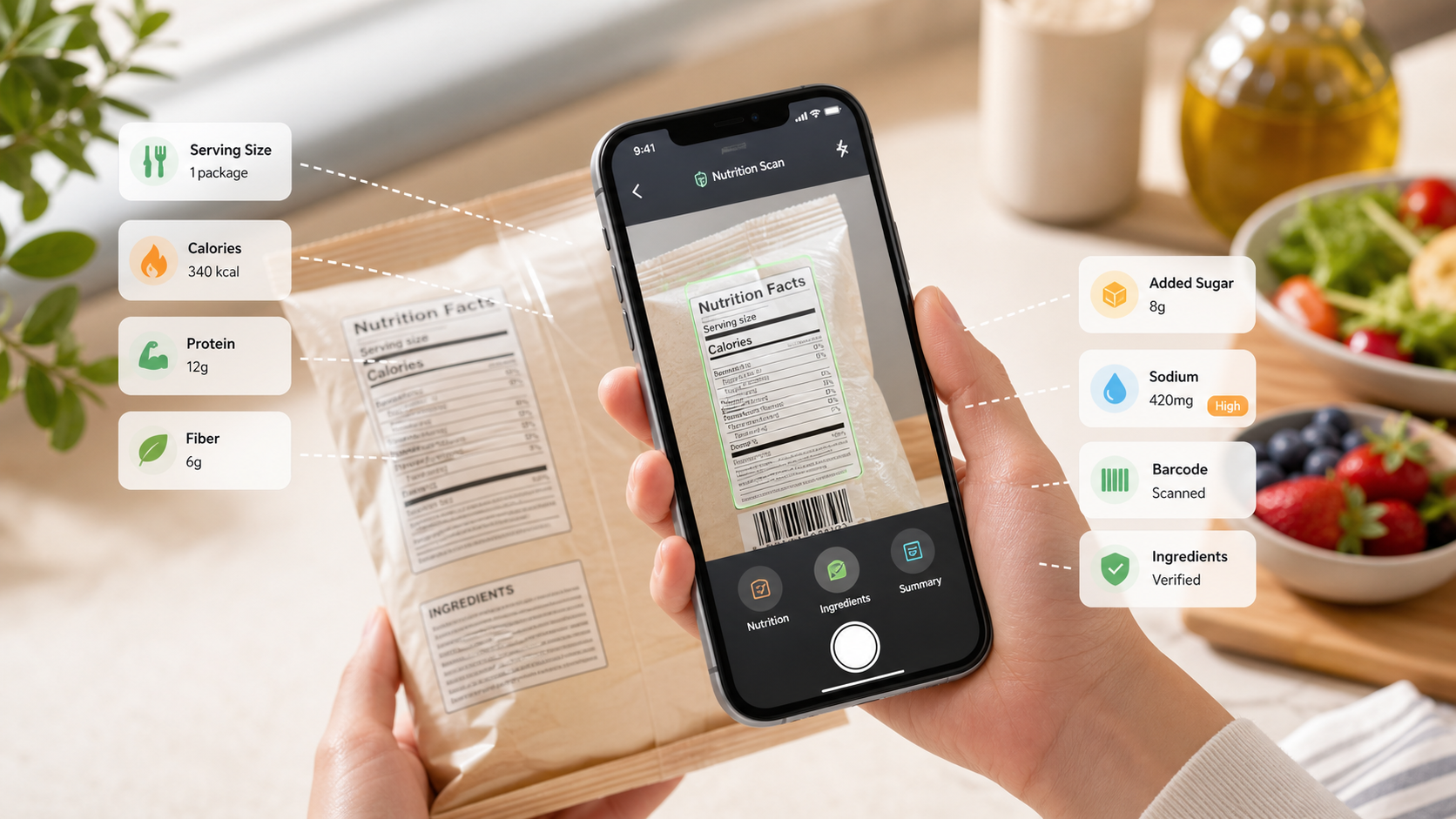
Quick answer: A free AI food scanner app is useful when it helps you scan a meal, check a barcode, read a Nutrition Facts label, verify serving size, review ingredients, and save the result to a nutrition log. Do not trust the first result blindly. The better workflow is scan, check the current label, correct what is wrong, then save the entry so your weekly Eatibo log stays useful.
Searching for an AI food scanner app free option usually means you want less friction. You do not want to type every food. You do not want to rebuild a meal from a long database list. You want to point the camera, get a reasonable estimate, and move on.
That is a good goal. The problem is that speed can hide mistakes. A photo scan may guess the wrong portion. A barcode result may be stale. A nutrition label scan may miss serving size. An ingredient scan may capture text but not understand your personal rules. A free app can still be valuable, but only if it makes verification easier instead of pretending the first answer is final.
Key takeaways
- Use a free AI food scanner app as a first pass, not as the final nutrition record.
- Photo scans are helpful for meals, but they need portion and ingredient review.
- Barcode scans are convenient for packaged foods, but the current package label should win when data conflicts.
- Nutrition Facts labels still matter: serving size, calories, protein, fiber, added sugar, sodium, and fat can change the decision.
- Eatibo works best when you scan, verify, and save the decision to a Nutrition Log you can review over time.
A good free AI food scanner app does not make food tracking magical. It makes the boring checks faster: what food is this, how much is one serving, what does the label say, and how often am I eating it?
What a free AI food scanner app should do
Use this five-part check before you trust any scan result.
| Check | What to verify | Why it matters |
|---|---|---|
| Photo scan | Food type, portion size, mixed ingredients, sauces, toppings, and hidden oils | A camera can identify a plate but still miss what changes calories or macros. |
| Barcode lookup | Product name, flavor, package size, serving size, and current label | Barcode databases can lag behind formula or package changes. |
| Nutrition label scan | Serving size, servings per container, calories, protein, fiber, added sugar, sodium, saturated fat, and total carbs | The Nutrition Facts panel is the practical source for packaged-food logging. |
| Ingredient scan | Allergens, additives, sweeteners, oils, grains, dairy, gluten cues, and personal avoid-list items | A nutrition estimate is incomplete if the ingredient list conflicts with your rules. |
| Food log | Date, meal context, Eat / Limit / Skip decision, and repeat pattern | One scan is less useful than a weekly pattern you can actually review. |
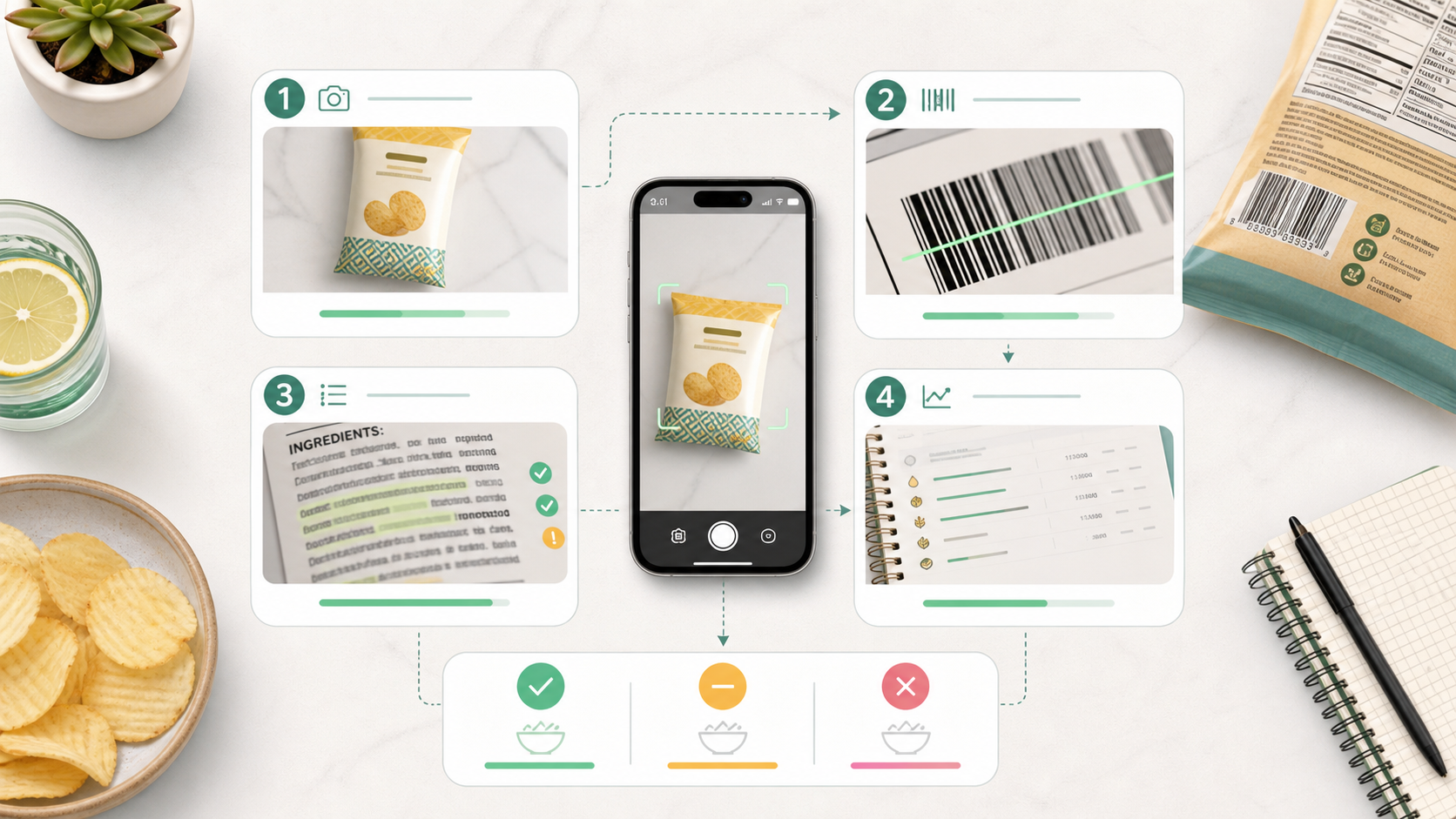
Photo scans are useful, but they are estimates
Photo-based food scanning is the feature most people want first. It feels simple: take a picture of a plate and let AI identify the meal. That can work well for obvious foods such as a sandwich, a bowl of oats, eggs, yogurt, fruit, rice, salad, or a packaged snack with visible branding removed.
The hard part is portion and composition. A photo may see pasta but not the amount of oil. It may see chicken but not whether the portion is 3 ounces or 6 ounces. It may identify a smoothie but not the protein powder, nut butter, full-fat yogurt, or sweetener inside. It may classify a salad as light while missing dressing, cheese, nuts, croutons, or avocado.
That is why the better workflow is:
- Let the app identify the likely food.
- Adjust the portion if the default looks wrong.
- Add missing ingredients when you know them.
- Treat the result as a practical estimate, not a lab measurement.
- Save it only after the entry feels close enough for your goal.
For many people, close enough is enough. A consistent estimate can reveal patterns. It can show that breakfast is usually low in protein, that snacks add more sodium than expected, or that restaurant meals are harder to estimate than home meals. Just keep the claim modest.
Barcode scans are convenient, not perfect
Packaged foods are where people expect a scanner to be more exact. The barcode feels official. The label is printed. The app should know what the product is.
Sometimes it does. A barcode can quickly identify a cereal, protein bar, yogurt, frozen meal, drink, sauce, cracker, or snack. It can reduce typing and make repeat logging faster.
But a barcode result can still be wrong in practical ways:
- The app may show an older version of the product.
- The flavor or package size may be different.
- The serving size may not match the package in your hand.
- A formula may have changed while the database entry stayed the same.
- Imported, regional, or store-brand products may have weaker coverage.
- The nutrition label may be correct while the ingredient list is incomplete.
The current package wins. If the barcode says one serving is 30 grams but the package in your hand says 28 grams, use the package. If the app says 8 grams of added sugar and the package says 10 grams, use the package. If the package has a new ingredient or allergen statement, use the package.
Eatibo's role is to make that correction less annoying. Scan the barcode, compare it with the label, then save the verified version. The app should help you avoid repeated typing, not ask you to ignore the label.
Nutrition Facts labels are the trust anchor
The FDA's Nutrition Facts label guidance explains the rows most shoppers should use first: serving size, calories, total fat, saturated fat, sodium, total carbohydrate, added sugars, fiber, protein, and key micronutrients. The label does not tell the whole story, but it gives you a stable structure for packaged foods.
When a free AI food scanner app gives you a result, check it against the label in this order:
| Label row | Why to check it before trusting the scan |
|---|---|
| Serving size | Most logging errors start here. A package may contain more than one serving. |
| Calories | Useful for rough intake awareness, especially when portion size changes. |
| Protein | Important for satiety, muscle-support goals, and comparing snacks or meals. |
| Fiber | Helps distinguish more filling carbs from low-fiber refined options. |
| Added sugar | A key packaged-food signal for snacks, drinks, cereals, yogurts, and sauces. |
| Sodium | Often missed in frozen meals, sauces, deli foods, salty snacks, and restaurant-style items. |
| Saturated fat | Important when comparing oils, dairy, desserts, fried foods, and processed snacks. |
If a scan gets the food name right but the serving wrong, the log can still be misleading. If it gets calories right but misses added sugar, sodium, or ingredients, the food decision may still be weak. A good app should make the Nutrition Facts panel easier to read, not replace it with a single confidence score.
Ingredient scans catch what macros miss
Nutrition numbers are only one layer. The ingredient list is where you catch things that a macro summary cannot show well.
That includes:
- Milk, egg, fish, Crustacean shellfish, tree nuts, peanuts, wheat, soy, or sesame cues
- Gluten-containing grains or dairy ingredients when those matter to you
- Sweeteners, sugar alcohols, syrups, and concentrated fruit ingredients
- Oils and fats such as soybean, canola, sunflower, coconut, palm, olive, avocado, butter, or ghee
- Additives, colors, preservatives, gums, emulsifiers, and flavoring terms
- Personal avoid-list items that are not universal health rules
The FDA's food allergy guidance is especially important here because allergen risk is not a normal nutrition preference. A scanner can help you read a label, but it cannot certify that a food is safe for a diagnosed allergy or rule out cross-contact. If allergy risk, celiac disease, pregnancy, kidney disease, diabetes, eating disorder recovery, medication timing, or a clinician-directed diet is involved, use qualified medical guidance.
For everyday label awareness, an ingredient scan is still useful. It can slow down a package enough to notice that a "healthy" snack has low fiber, a "high protein" drink has sugar alcohols you dislike, or a "clean" product has an oil swap that changes saturated fat.
How to compare free app results
When you try a free AI food scanner app, test it with the foods you actually eat. Do not judge it only by a demo.
Try this short test set:
| Test food | What a useful app should handle |
|---|---|
| Simple meal photo | Identify the main foods and let you adjust portions. |
| Mixed meal photo | Ask for corrections instead of pretending it knows every ingredient. |
| Packaged snack barcode | Match the product and let you compare serving size to the package. |
| Nutrition label photo | Capture key rows without losing serving size or added sugar. |
| Ingredient list photo | Highlight possible allergens, additives, oils, and personal avoid-list terms. |
| Repeat product | Save a corrected version so the second log is faster. |
The best free AI food scanner app for you is the one that gets the boring repeat foods right. If you eat the same yogurt, bar, frozen meal, protein drink, cereal, or snack often, the app should make those entries faster and more consistent.
Where Eatibo fits
Eatibo is built for the scan-then-verify workflow. Start with a photo, barcode, nutrition label, or ingredient list. Then review the parts that matter for the decision: food identity, serving size, nutrition rows, ingredient cues, and the role this food plays in your week.
Use a simple Eat / Limit / Skip frame:
- Eat: The scan matches the food, the serving is realistic, the label checks out, and the food fits your current routine.
- Limit: The scan is usable, but the label shows high added sugar, high sodium, low fiber, low protein, a weak portion tradeoff, or a pattern you do not want often.
- Skip: The scan is unclear, the package conflicts with your rules, the label is unreadable, or the food touches a medical, allergy, or clinician-directed boundary you cannot verify.
The Nutrition Log is the part that turns scanning into a habit. If you log only one meal, you get one estimate. If you scan and verify for a week, you start seeing repeat patterns: which snacks are low protein, which drinks carry added sugar, which frozen meals push sodium, and which products are easy to trust because the label and log stay consistent.
For a broader package workflow, read Nutrition Label Scanner App: Scan Before You Log. If your main concern is ingredients, use Food Additives: How to Scan Ingredient Lists Smarter. For snack comparisons, Low-Sugar Snacks: Scan Added Sugar Before You Buy, High-Protein Snacks: Scan Labels Before You Buy, and Seed-Oil-Free Snacks: Scan Ingredient Lists Without Overreacting extend the same verification habit.
When a free app is enough
A free AI food scanner app may be enough when your goal is general awareness. Maybe you want to log meals a few times per week, compare snacks, reduce added sugar, increase protein, or understand how often restaurant meals show up. You do not need every advanced feature to start seeing useful patterns.
Free is usually enough if you can:
- Scan common meals and packaged foods.
- Correct portions without fighting the interface.
- Review the label before saving.
- Save repeat foods.
- See a simple nutrition history.
- Keep your personal rules visible.
You may outgrow free when you want more detailed trend review, deeper personalization, more advanced ingredient filters, coach-style explanations, reminders, meal planning, exports, or more reliable barcode and label correction tools. The right upgrade point is not when the app looks impressive. It is when the paid workflow saves enough time or catches enough decisions to matter.
Health boundaries
Use extra caution when food decisions involve diagnosed allergies, celiac disease, diabetes, kidney disease, heart disease, high blood pressure, pregnancy, pediatric nutrition, eating disorder recovery, medication or supplement timing, hydration restrictions, or any clinician-directed diet.
Eatibo can help scan, organize, and log food information. It is not a medical device, dietitian, allergist, emergency plan, food safety authority, medication interaction checker, or substitute for medical care. If a food decision is high-stakes, confirm it with the package, the manufacturer when needed, and a qualified clinician.
Frequently asked questions
Is there a good AI food scanner app free option?
Yes, if you use it for first-pass scanning and practical logging. A free AI food scanner app can help identify foods, scan barcodes, read labels, and save repeat entries. It still needs human verification for serving size, ingredients, package changes, and health-sensitive decisions.
Can an AI food scanner app estimate calories from a photo?
It can estimate, but it is not exact. Photo scans can miss portion size, oils, sauces, toppings, and hidden ingredients. Use the estimate as a starting point, then adjust the serving and ingredients before saving the log.
Is barcode scanning more accurate than photo scanning?
Barcode scanning can be more specific for packaged foods, but it is not automatically accurate. Product databases can be outdated, and packages can change. Always compare the barcode result with the current Nutrition Facts label and ingredient list.
What should I check before trusting a free food scanner app?
Check the food identity, serving size, barcode match, Nutrition Facts label, ingredient list, allergens or personal avoid-list items, and whether the saved entry matches the food you actually ate.
Can Eatibo replace a dietitian or doctor?
No. Eatibo can scan labels, estimate meals, and organize nutrition logs. It should not replace a clinician, registered dietitian, allergist, emergency plan, medication guidance, or care plan for a diagnosed condition.
Summary
A free AI food scanner app is most useful when it speeds up the right checks. Let the app identify the food, scan the barcode, read the label, and save the log. Then verify the current package, serving size, ingredients, and nutrition rows before you trust the result. The goal is not perfect automation. The goal is a faster, more consistent food record you can actually use.
Last updated: June 8, 2026
Sources
- FDA: How to Understand and Use the Nutrition Facts Label
- FDA: What's on the Nutrition Facts Label
- FDA: Food Allergies
- USDA: FoodData Central
Related reading
- Nutrition Label Scanner App: Scan Before You Log gives the full packaged-food scan workflow.
- Food Additives: How to Scan Ingredient Lists Smarter helps review ingredient lists alongside nutrition numbers.
- Low-Sugar Snacks: Scan Added Sugar Before You Buy keeps added sugar checks practical.
- Seed-Oil-Free Snacks: Scan Ingredient Lists Without Overreacting shows how to apply ingredient preferences without overclaiming.